
How Smart Roller Cart Software Eliminates Missing Parts in Millwork & Cabinet Manufacturing
Discover how dynamic Roller Cart tracking connects your ERP to CNC and edgebanding stations, eliminating missing parts and streamlining cabinet assembly.
In custom cabinet and architectural millwork manufacturing, nothing slows production down like a missing part.
When a single upper cabinet side or specialized filler strip goes missing after nested CNC cutting, the entire assembly process grinds to a halt. Operators waste valuable time scouring the shop floor, searching through unsorted carts, or worse rerunning a single part through the nest, throwing off material yield and schedule delivery.
Managing the physical flow of parts from CNC cutting and edgebanding to finishing and assembly requires real-time visibility. That is why dynamic Roller Cart Tracking integrated directly into your ERP system is changing how high-mix, low-volume cabinet shops operate.
The Shop Floor Sorting Dilemma
Cabinet parts come in all shapes and sizes:
- Large panels (carcase sides, bottoms, tops)
- Upper cabinet doors and adjustable shelves
- Lower cabinet drawer fronts and stretchers
- Delicate finished trim and face-frame components
When parts come off the CNC or edgebander in nested order rather than assembly order, operators face a sorting headache. Without a structured physical tracking system, parts get mixed up, misplaced, or damaged during transit between work centers.
How ERP-Integrated Roller Cart Tracking Works
Rather than relying on paper labels or manual staging tables, Roller Cart Software turns physical carts into intelligent, capacity-aware staging stations.
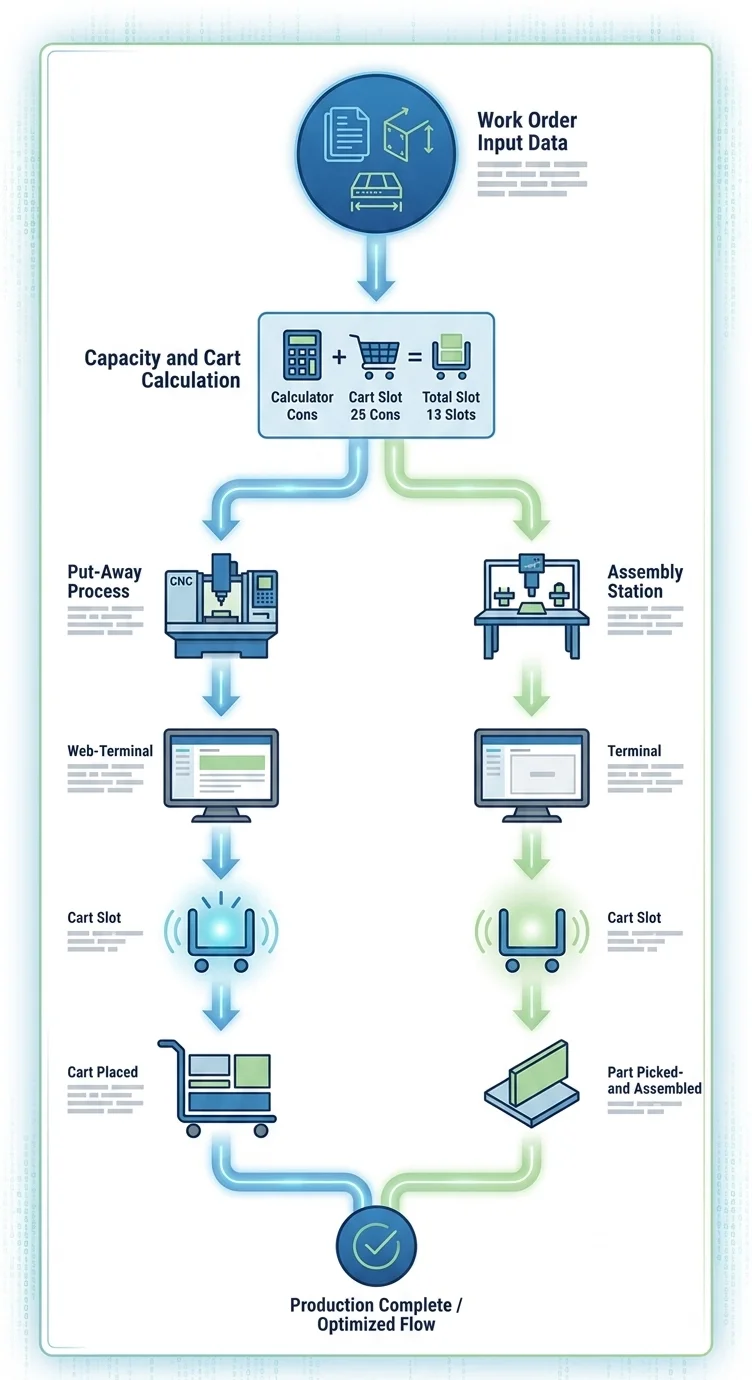
1. Automated Capacity & Cart Calculation
From the work order, the ERP already knows every part’s exact dimensions, including thickness and sequence. The system automatically calculates:
- How many physical carts are required for the job.
- Which slots are designated for large pieces, upper parts, or lower components.
- Total slot utilization before a single sheet of plywood hits the CNC table.
2. Guided Part Loading (Put-Away)
As parts are cut or edgebanded, the shop-floor terminal prompts the operator with clear visual cues. The web-based interface flashes the exact Cart Number and Slot Number designated for that specific component. The operator simply places the part into the illuminated slot - no guessing, no manual sorting.
3. Error-Free Assembly Picking
When the assembly or finishing team is ready to build a unit, the system guides the pick process. The screen flashes to direct the worker to grab the precise part from Cart X, Slot Y.
Key Benefits for Custom Cabinet & Millwork Manufacturers
- Zero Time Spent Searching for Parts: Operators know instantly where every panel is located across the entire factory floor.
- Reduced Part Damage: Storing parts systematically in designated slots prevents scratching, chipping, and bowing.
- Faster Throughput & Assembly: Assemblers spend 100% of their time assembling rather than sorting raw components.
- Seamless Scalability: Dynamic visual web screens allow new shop workers to become productive on day one without steep learning curves.
ARE YOU READY?
Take the Next Step
Upgrade Your Millwork Production Flow
Eliminate assembly bottlenecks and bring total visibility to your cabinet shop floor.
Contact our team today to schedule a live demo of our ERP Roller Cart Tracking module.