|
Freight vendors can be assigned to a customer directly and/or be assigned to individual customer ship to addresses. In addition, multiple freight vendors can be assigned to a single ship to address; one freight vendor is typically designated as the default or primary freight vendor for the ship to address.
To assign a freight vendor to the currently viewed customer, select the desired freight vendor from the Freight Vendor Info combo. If this combo is empty this means that there are no vendors flagged as freight vendors in your ActiveM database. Enter the freight account number into the text box to the right of the combo.
To assign one or more freight vendors to the currently viewed customer's ship to address(es), click on the ellipses button located beside the freight account text box. The form shown in the image below will open.
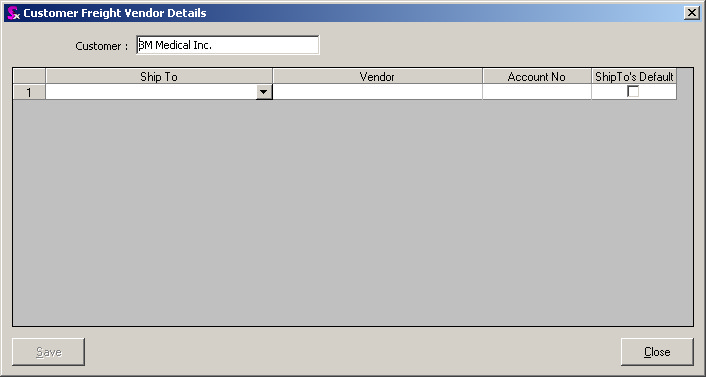
Select the relevant ship to address and freight vendor then enter the account number into the Account No field. If the selected freight vendor is the default freight vendor for this ship to address, check the ShipTo's Default checkbox. In the example below, multiple ship to addresses have been assigned freight vendors and one ship to address has been assigned multiple freight vendors.
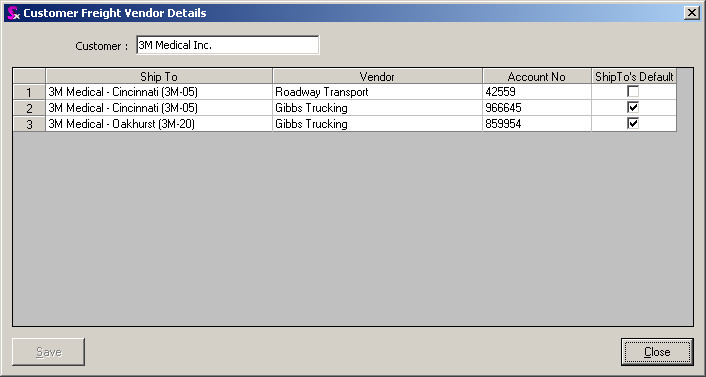
How freight vendor information is displayed on the Additional Information tab of the sales order module depends on how the freight vendor is setup against the customer and / or ship to address. The rules of thumb to remember are as follows:
| 1. | If there is a freight vendor assigned to the customer, but not against the selected ship to address the freight vendor assigned to the customer will be displayed. |
| 2. | If there is a default freight vendor assigned to the selected ship to address, this freight vendor will be displayed even if there is a freight vendor assigned to the customer. This adheres to standard system logic where values defined for ship to addresses will prevail over their respective values defined against the customer master. |
|