|
OrderStream provides you with the ability of setting up one parent location and multiple satellite locations in order to track sales and bill satellite locations directly.
The following example uses “Home Depot” to show how this works.
Set up a new account for the parent company as shown below. In this case, Home Depot head office. Note: Take care to select the appropriate Currency Code, Price List, Account Set and Tax Info.
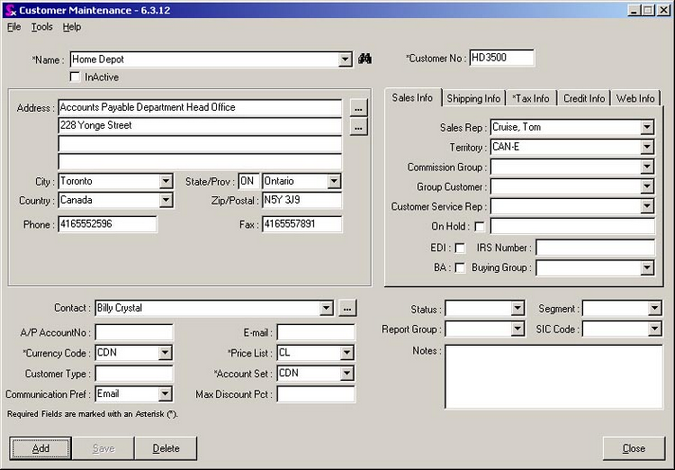
Set up a new account for a local Home Depot Store #501 with the first “Home Depot” head office account selected in the Group Customer field. Make sure to fill in all of the relevant accounting information as was completed in step one above.

Next create a Sales Order (or Estimate). Notice that Seradex now gives you the option of selecting from two Bill To locations from the combo box.
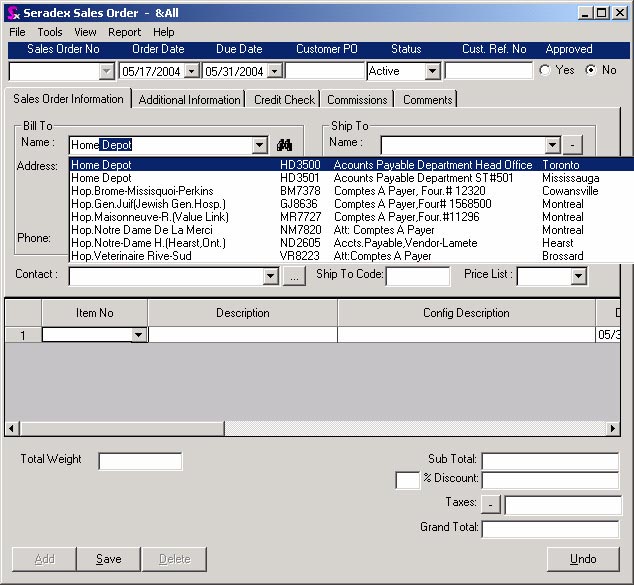
Since the satellite location is now connected to the parent (via the Group Customer field), you can create reports from your accounting system to display sales information for the parent company including all satellite location by month, quarter or year.
|