|
As the name suggests, Rework/Remake has two modes: Rework and Remake.
Rework: Think of it as a way of undoing an operation. If you completed an operation in error, Rework can undo that operation completion.
Remake: This can be used to undo a work order completion, turning a finished product into its component parts (or into nothing if you're scrapping it entirely).
Rework has two modes, described below:
| 1. | Send back to prior operations, which effectively is an "undo" for operation completions. This could mean a simple reduction in the quantity having gone through the operation, or a reset of its Completed flag (from True to False) with or without a reduction in the quantity having been completed. Such quantity reductions are achieved by writing records to DataCollectionDetails offsetting previous completions, and are then written to the ToBeScheduled tables once Scheduling is opened. |
| 2. | Scrap and restart, which allows some quantity of partially completed items to be undone and then either turned into their component parts or scrapped entirely. |
 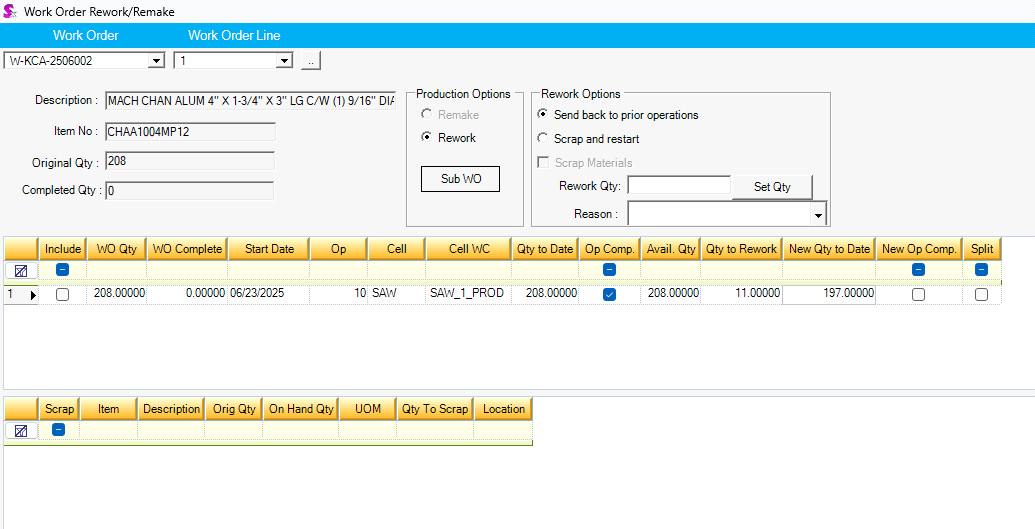
In the above case, 11 units of the completed operation were reworked, setting the Completed flag back to False.
The "Scrap and Restart" mode needs a little more explanation. If this is used, it will undo that quantity of partially completed items by first turning the partially completed item (which has no inventory presence) into an instance of the completed item. The intended next step is to use Remake mode - this automatically comes up for the quantity reworked just after the Process button has been clicked - to then process the partially completed item into either its component parts or to scrap those component parts, according to what has been done to it so far. This leads into the Remake mode description to follow.
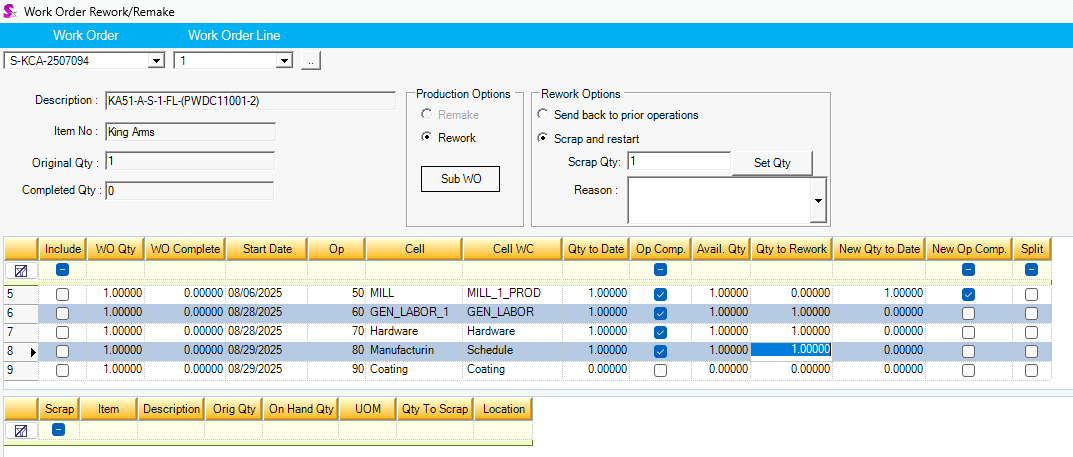 
In the above case, the last three completed operations were undone using Rework > Scrap and restart. Processing the Scrap and restart then brings up the same work order line in Remake mode, where the components consumed in the line’s production so far can be either returned to inventory or scrapped, according to what was salvaged.
Remake has three modes, described below:
| 1. | Uncomplete reduces the quantity completed and restores the consumed inventory. |
| 2. | Reproduce increases the quantity ordered and restores the consumed inventory. |
| 3. | Scrap leaves the quantities as they are and does not restore the consumed inventory. |
All these options require that you have the completed unit in inventory; you can't remake something that has already been shipped or otherwise relieved from inventory.
Uncomplete and Reproduce both restore some or all of the components which went into its production. The lower grid allows the user to customize this according to whatever was "salvaged" from the unmaking: increase the Qty To Scrap column for each component to reflect what should actually be returned to inventory, if it is less than the full quantity. (Increasing the Qty To Scrap value will correspondingly decrease the Qty To Return value.)
Scrap item mode should be used to undo a unit you want to be scrapped and not remade. Choosing this mode sets the Qty To Scrap value to the full amount (to reflect the fact that nothing was salvaged) and makes no provision for going through the process of manufacturing the item again.
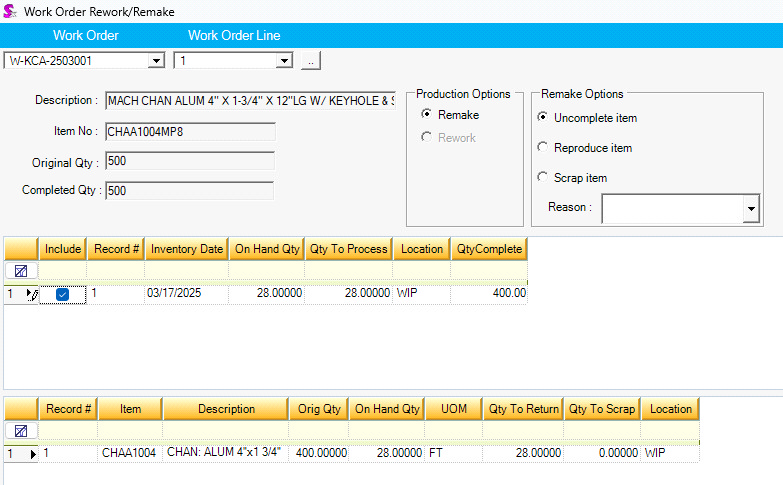
In the above example, the full quantity of 28 units would be uncompleted, meaning that the 28 finished units would be relieved from inventory, replaced by the components which had originally been consumed to produce them. Some or all of that quantity of components could instead by scrapped by providing a non-zero value to the Qty To Scrap column, which would in turn reduce the value in Qty To Return.
|


